





移工金融
'%3e%3cpath%20d='M12%200.75V12H0.75C0.75%2018.225%205.775%2023.25%2012%2023.25C18.225%2023.25%2023.25%2018.225%2023.25%2012C23.25%205.775%2018.225%200.75%2012%200.75Z'%20fill='%23ED4C5C'/%3e%3cpath%20d='M12%200.75C5.775%200.75%200.75%205.775%200.75%2012H12V0.75Z'%20fill='%232A5F9E'/%3e%3cpath%20d='M9%207.6125L10.875%207.125L9%206.6375L10.3875%205.25L8.5125%205.7375L9%203.8625L7.6125%205.25L7.125%203.375L6.6375%205.25L5.25%203.8625L5.7375%205.7375L3.8625%205.25L5.25%206.6375L3.375%207.125L5.25%207.6125L3.8625%209L5.7375%208.5125L5.25%2010.3875L6.6375%209L7.125%2010.875L7.6125%209L9%2010.3875L8.5125%208.5125L10.3875%209L9%207.6125Z'%20fill='white'/%3e%3cpath%20d='M7.12383%209.26328C8.30434%209.26328%209.26133%208.30629%209.26133%207.12578C9.26133%205.94527%208.30434%204.98828%207.12383%204.98828C5.94332%204.98828%204.98633%205.94527%204.98633%207.12578C4.98633%208.30629%205.94332%209.26328%207.12383%209.26328Z'%20fill='%23428BC1'/%3e%3cpath%20d='M7.125%209C8.16053%209%209%208.16053%209%207.125C9%206.08947%208.16053%205.25%207.125%205.25C6.08947%205.25%205.25%206.08947%205.25%207.125C5.25%208.16053%206.08947%209%207.125%209Z'%20fill='white'/%3e%3cmask%20id='path-6-inside-1_2557_45877'%20fill='white'%3e%3cpath%20fill-rule='evenodd'%20clip-rule='evenodd'%20d='M12%2023.25C5.775%2023.25%200.75%2018.225%200.75%2012C0.75%205.775%205.775%200.75%2012%200.75C18.225%200.75%2023.25%205.775%2023.25%2012C23.25%2018.225%2018.225%2023.25%2012%2023.25Z'/%3e%3c/mask%3e%3cpath%20d='M-0.75%2012C-0.75%2019.0534%204.94657%2024.75%2012%2024.75V21.75C6.60343%2021.75%202.25%2017.3966%202.25%2012H-0.75ZM12%20-0.75C4.94657%20-0.75%20-0.75%204.94657%20-0.75%2012H2.25C2.25%206.60343%206.60343%202.25%2012%202.25V-0.75ZM24.75%2012C24.75%204.94657%2019.0534%20-0.75%2012%20-0.75V2.25C17.3966%202.25%2021.75%206.60343%2021.75%2012H24.75ZM12%2024.75C19.0534%2024.75%2024.75%2019.0534%2024.75%2012H21.75C21.75%2017.3966%2017.3966%2021.75%2012%2021.75V24.75Z'%20fill='%23ED4C5C'%20mask='url(%23path-6-inside-1_2557_45877)'/%3e%3c/g%3e%3cdefs%3e%3cclipPath%20id='clip0_2557_45877'%3e%3crect%20width='24'%20height='24'%20fill='white'/%3e%3c/clipPath%3e%3c/defs%3e%3c/svg%3e)
'%3e%3cpath%20d='M22.5%2012C22.5%2017.799%2017.799%2022.5%2012%2022.5C6.20101%2022.5%201.5%2017.799%201.5%2012C1.5%206.20101%206.20101%201.5%2012%201.5C17.799%201.5%2022.5%206.20101%2022.5%2012Z'%20fill='%23ED4C5C'%20stroke='%23ED4C5C'%20stroke-width='1.5'/%3e%3cpath%20d='M12%2014.625L15.7125%2017.25L14.325%2012.975L18%2010.2H13.425L12%206L10.6125%2010.2H6L9.675%2012.975L8.2875%2017.25L12%2014.625Z'%20fill='%23FFE62E'/%3e%3c/g%3e%3cdefs%3e%3cclipPath%20id='clip0_2557_45905'%3e%3crect%20width='24'%20height='24'%20fill='white'/%3e%3c/clipPath%3e%3c/defs%3e%3c/svg%3e)
'/%3e%3c/svg%3e)

%20scale(2.81%202.81)'%3e%3cpath%20d='M%200%2045%20c%200%2019.592%2012.524%2036.25%2030%2042.429%20c%204.685%201.657%209.723%202.567%2014.975%202.57%20h%200.051%20c%205.252%20-0.003%2010.289%20-0.914%2014.974%20-2.57%20c%2017.466%20-6.175%2029.985%20-22.818%2030%20-42.396%20v%20-0.068%20C%2089.985%2025.389%2077.466%208.745%2060%202.571%20C%2055.307%200.911%2050.261%200%2045%200%20c%20-5.261%200%20-10.308%200.912%20-15%202.571%20C%2012.524%208.75%200%2025.408%200%2045%20z'%20style='stroke:%20none;%20stroke-width:%201;%20stroke-dasharray:%20none;%20stroke-linecap:%20butt;%20stroke-linejoin:%20miter;%20stroke-miterlimit:%2010;%20fill:%20rgb(243,244,245);%20fill-rule:%20nonzero;%20opacity:%201;'%20transform='%20matrix(1%200%200%201%200%200)%20'%20stroke-linecap='round'/%3e%3cpath%20d='M%200%2045%20c%200%205.439%200.969%2010.651%202.737%2015.477%20h%2084.525%20c%201.765%20-4.816%202.734%20-10.016%202.738%20-15.443%20v%20-0.068%20c%20-0.004%20-5.071%20-0.853%20-9.943%20-2.404%20-14.489%20H%202.404%20C%200.85%2035.034%200%2039.917%200%2045%20z'%20style='stroke:%20none;%20stroke-width:%201;%20stroke-dasharray:%20none;%20stroke-linecap:%20butt;%20stroke-linejoin:%20miter;%20stroke-miterlimit:%2010;%20fill:%20rgb(0,27,154);%20fill-rule:%20nonzero;%20opacity:%201;'%20transform='%20matrix(1%200%200%201%200%200)%20'%20stroke-linecap='round'/%3e%3cpath%20d='M%2078.528%2075%20H%2011.472%20C%2016.459%2080.566%2022.808%2084.887%2030%2087.429%20C%2034.693%2089.088%2039.739%2090%2045%2090%20c%205.261%200%2010.307%20-0.911%2015%20-2.571%20C%2067.192%2084.887%2073.541%2080.566%2078.528%2075%20z'%20style='stroke:%20none;%20stroke-width:%201;%20stroke-dasharray:%20none;%20stroke-linecap:%20butt;%20stroke-linejoin:%20miter;%20stroke-miterlimit:%2010;%20fill:%20rgb(231,0,0);%20fill-rule:%20nonzero;%20opacity:%201;'%20transform='%20matrix(1%200%200%201%200%200)%20'%20stroke-linecap='round'/%3e%3cpath%20d='M%2030%202.571%20c%20-7.394%202.614%20-13.896%207.11%20-18.944%2012.906%20h%2067.889%20C%2073.897%209.681%2067.395%205.185%2060%202.571%20c%20-4.584%20-1.621%20-9.506%20-2.521%20-14.635%20-2.563%20h%20-0.729%20C%2039.507%200.049%2034.584%200.95%2030%202.571%20z'%20style='stroke:%20none;%20stroke-width:%201;%20stroke-dasharray:%20none;%20stroke-linecap:%20butt;%20stroke-linejoin:%20miter;%20stroke-miterlimit:%2010;%20fill:%20rgb(231,0,0);%20fill-rule:%20nonzero;%20opacity:%201;'%20transform='%20matrix(1%200%200%201%200%200)%20'%20stroke-linecap='round'/%3e%3c/g%3e%3c/svg%3e)
MG PAY My Wallet Top-Up Process
The MG PAY My Wallet operates on a prepaid top-up system. Users can add funds to their wallet through various methods, including cash top-ups at convenience stores, bank account transfers, and depositing lottery-winning invoice rewards. Once funds are added, the balance in the MG PAY Wallet can be used to pay for purchases at a wide range of merchants and for everyday spending needs.
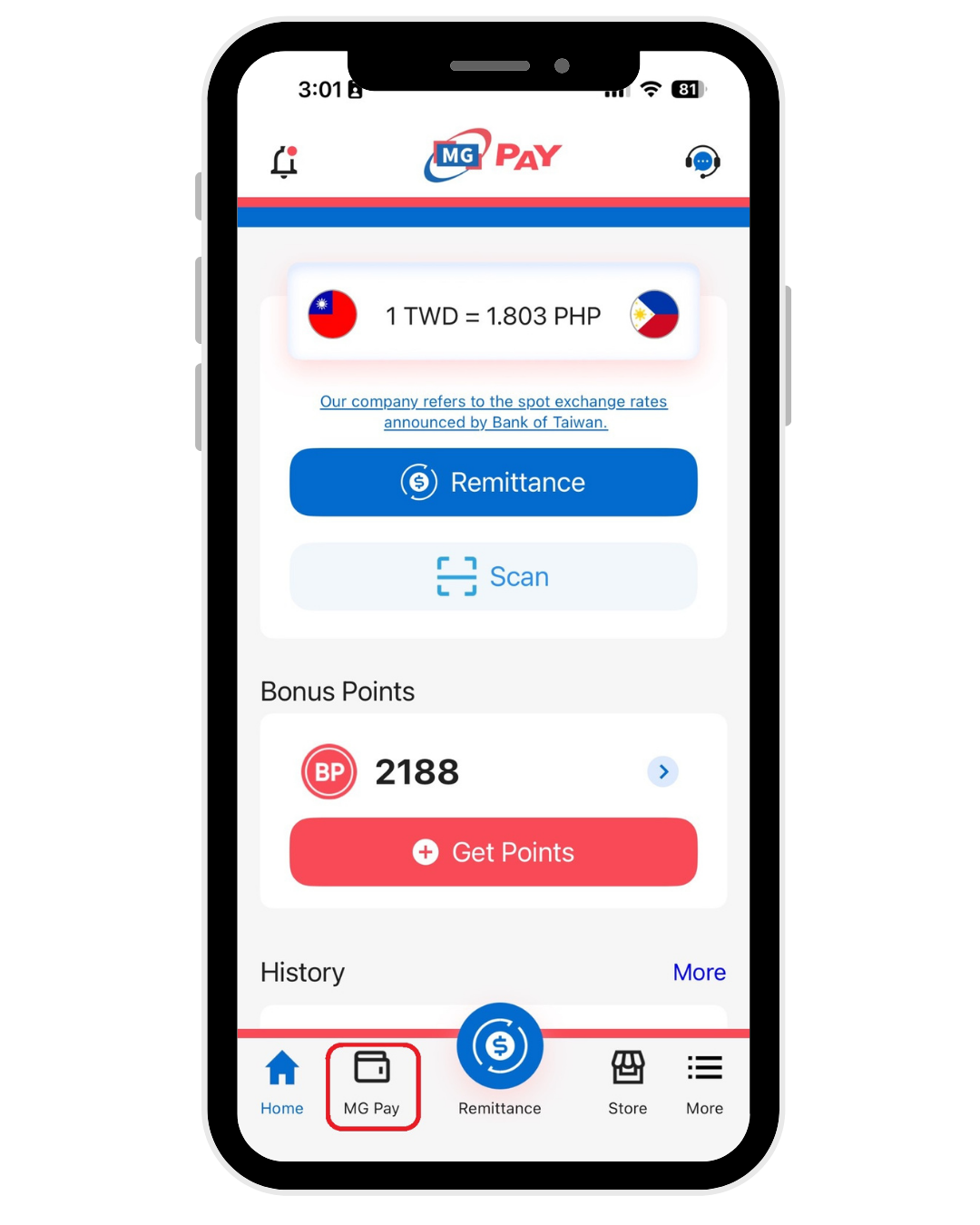
1. Tap MG Pay
Open the app homepage and tap the “MG Pay” icon in the bottom navigation bar to access the feature menu.
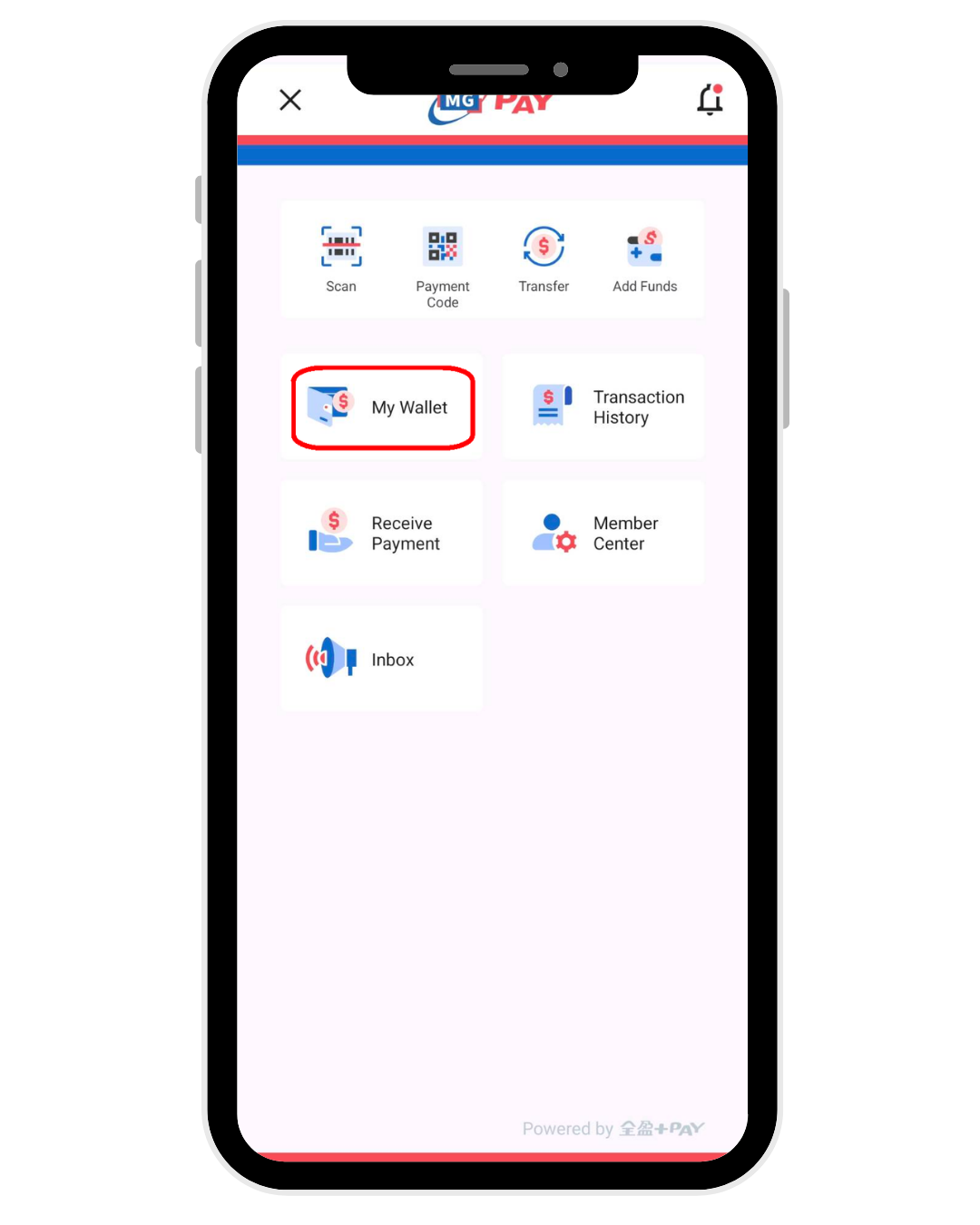
2. Go to My Wallet
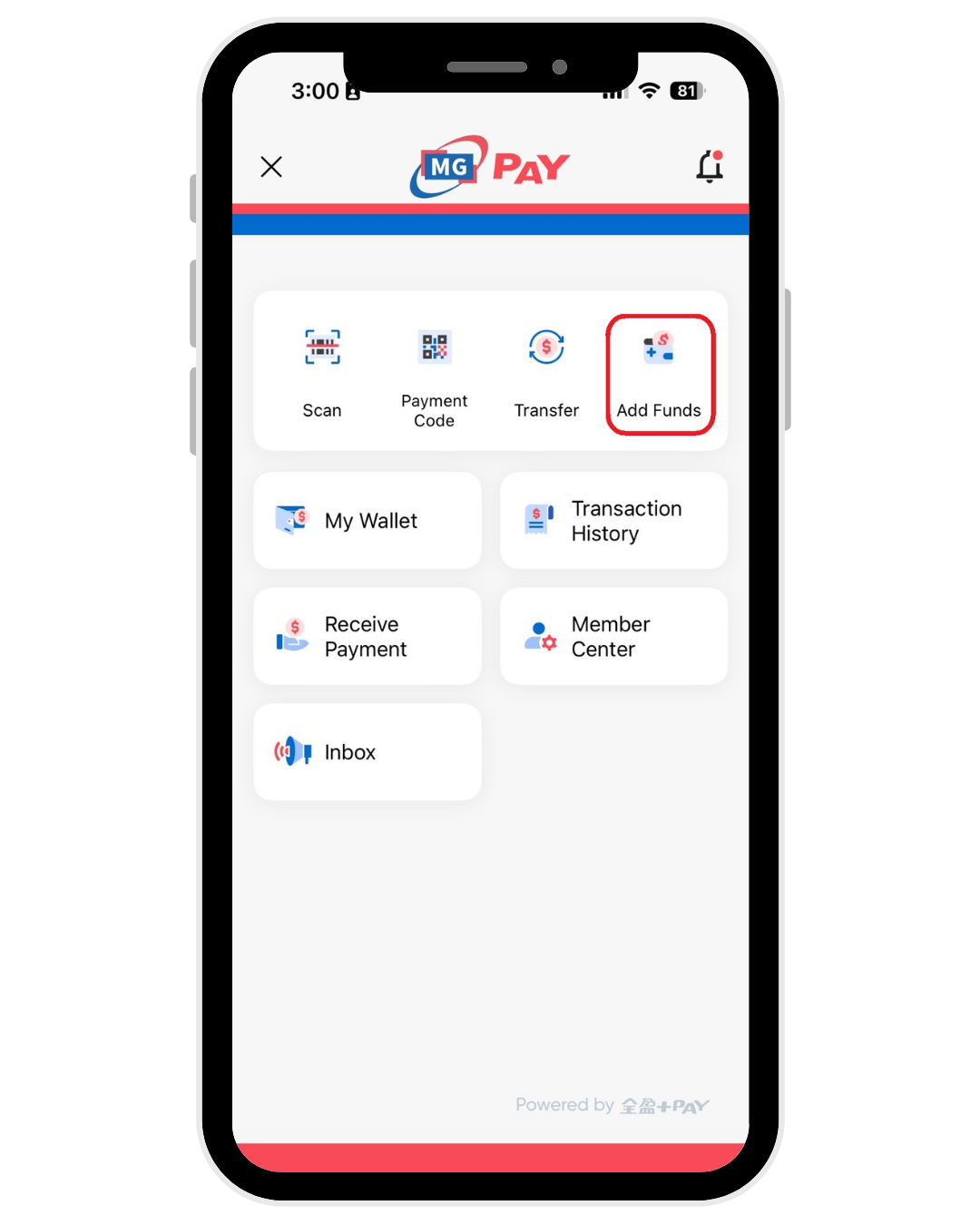
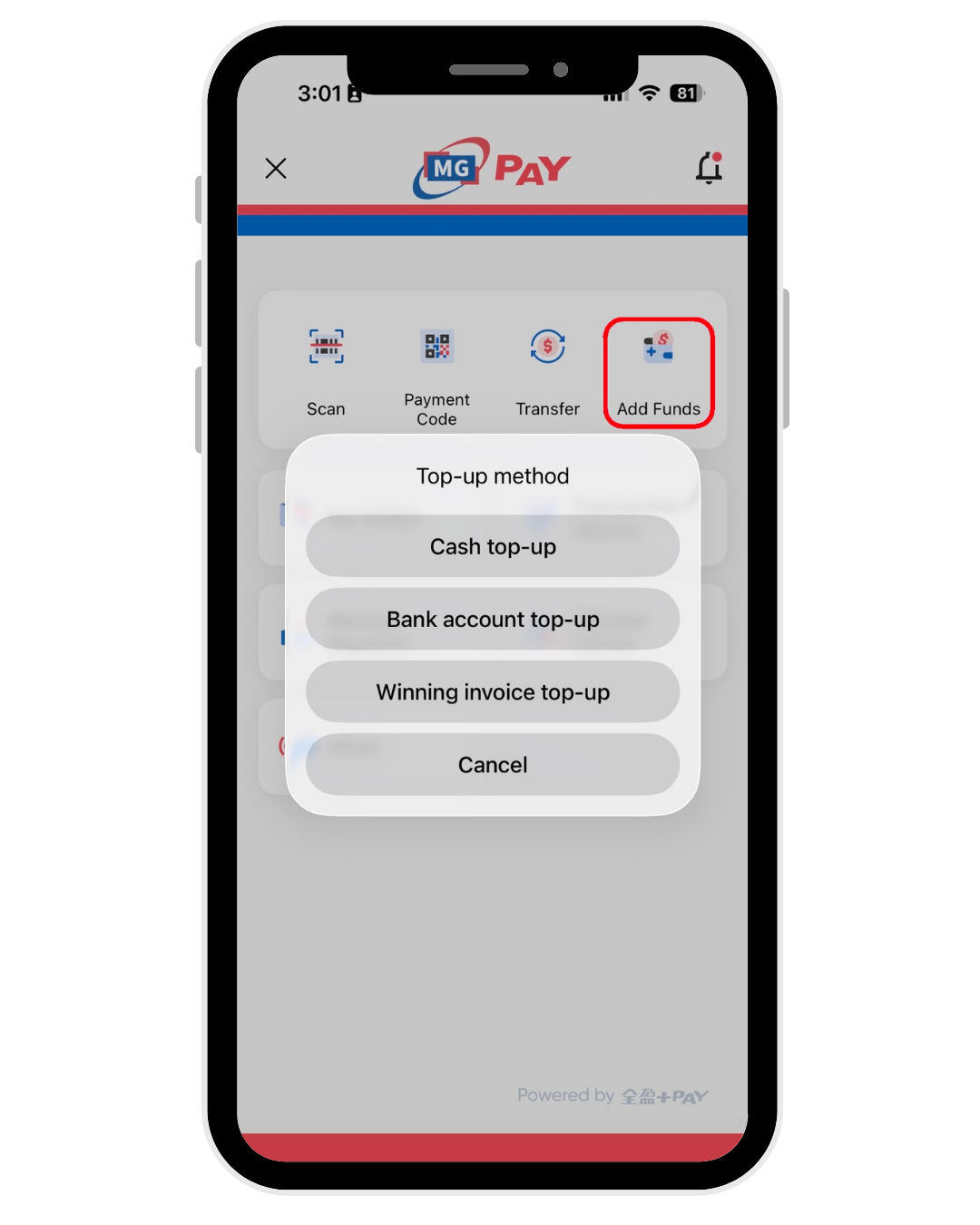
From the menu, select “Add Funds” A list of convenient top-up options will then be displayed for you to choose from.
3. Select Top-Up Method
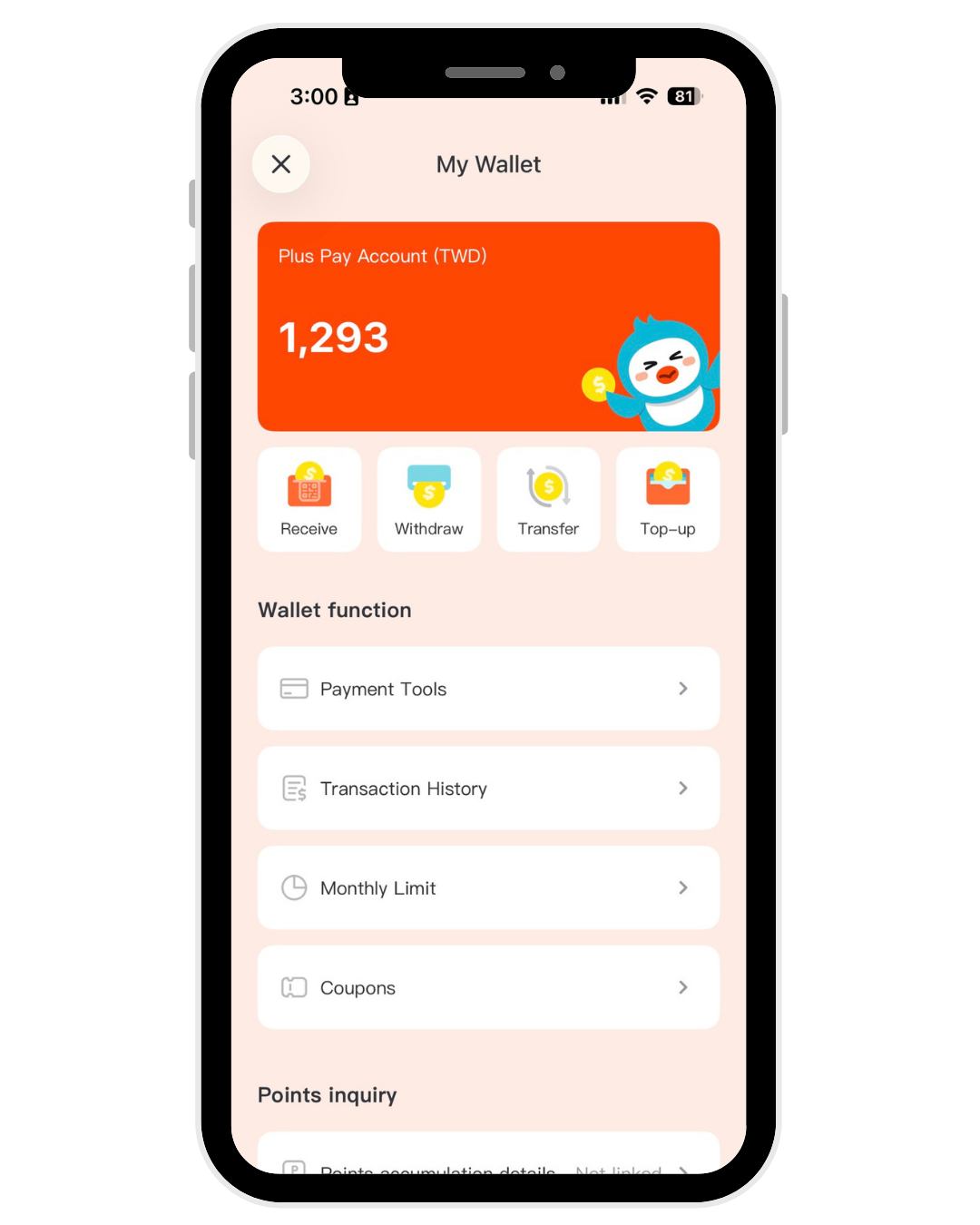
4. Tap "My Wallet"
5. Check Your Wallet Balance
Once the top-up is completed, you can immediately view your MG Pay wallet balance and start using the wallet’s payment and account inquiry features.